Background
Hello, I'm a Japanese web engineer teaching IT in Cambodia.
This time, I'd like to introduce an experiment I've implemented using Telegram, an essential communication tool in Cambodia, to automatically post messages via a bot every morning to check class attendance.
Process
General Flow
The general steps we took are as follows:
- Make the bot usable on Telegram
- Confirm the target Group ID
- Use GAS (Google Apps Script) to automatically post only on days when there are classes using the Telegram API
How to enable bots on Telegram
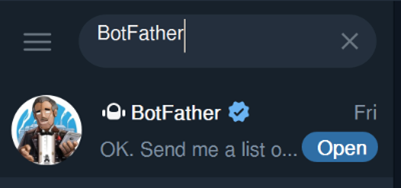
- Search for BotFather on Telegram and open the chat.
- Type
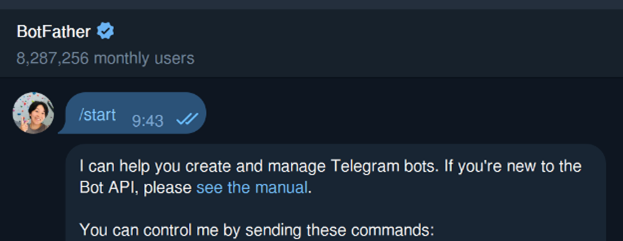
/startin the chat with BotFather and send it.
- Type
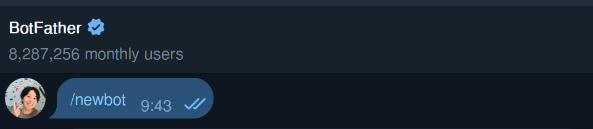
/newbotin the chat with BotFather and send it.
- Give your bot a name.

- Give your bot a username.
I accidentally used the same name for both the bot and my username, but since I'm only using the bot to post, I haven't encountered any particular problems so far.
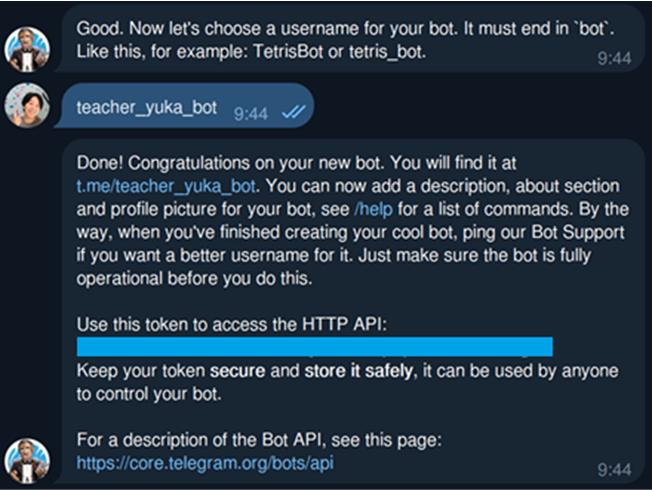 Once you've finished naming your bot, BotFather will provide you with a token to use the HTTP API. Please handle this token with care to prevent it from being leaked.
- Keep your chat with your bot open.
Later, you will need to send a message to your bot in a chat, so please open the chat by clicking the t.me/username link in the message you received from BotFather.
Check the Group ID to which you are posting.
We need the Group ID to send the message to when calling the Telegram API, so we'll check that.
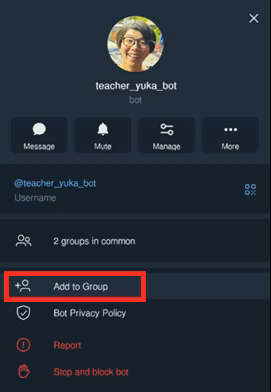
- Add your bot to the group
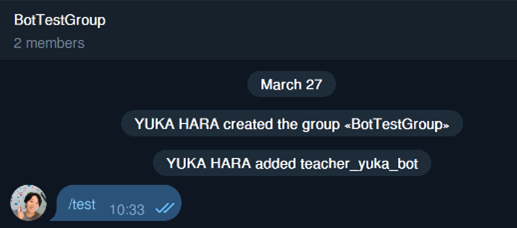
- Type
/testin the group chat and send it.
- Use the Telegram API to find the Group ID.
Enter the following URL. A GET request is sufficient. Replace 1234567890:Abcdefg012_HiJk with your own Bot Token.
https://api.telegram.org/bot1234567890:Abcdefg012_HiJk/getUpdates
When you make a request, you will receive a response like the one below.
The value of "id" in this response is the Group ID. (The minus sign is also part of the Group ID.)
"chat": {
          "id": -1234567890,
          "title": "BotTestGroup",
          "type": "group",
          "all_members_are_administrators": false,
          "accepted_gift_types": {
            "unlimited_gifts": false,
            "limited_gifts": false,
            "unique_gifts": false,
            "premium_subscription": false,
            "gifts_from_channels": false
          }
        }
- Posting Test
Posts can be made via bot using a request like the one below. Please test it if necessary. URL: Replace 1234567890:Abcdefg012_HiJk with your own Bot Token.
https://api.telegram.org/bot1234567890:Abcdefg012_HiJk/sendMessage
Request Method: POST Request Body: Replace -1234567890 with your own Group ID.
{
    "chat_id": -1234567890,
    "text": "This is a test message."
}
Use Google Apps Script (GAS) to automatically post using the Telegram API only on days when there are classes.
Now that Telegram is ready, we'll create an automated posting system using Google Apps Script (GAS).
- Create a new project in GAS
Open Google Apps Script (https://script.google.com/home) and open a new project using the "New Project" button.
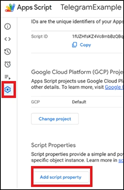
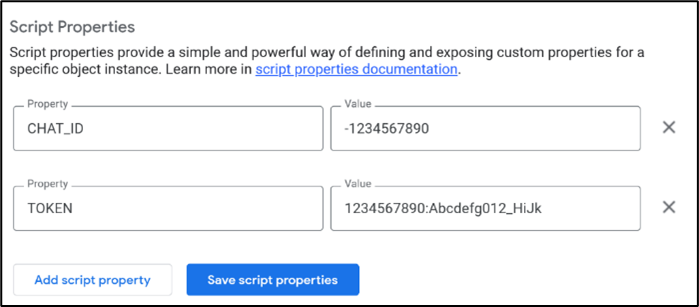
- Add the token and Group ID to the Script Property
Set any values that need to be handled carefully in the Property.
- Write Code
Write code that sends messages by calling an API only on days when there are classes.
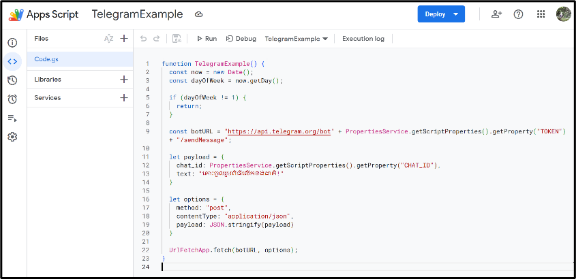
This is an example of coding:
function TelegramExample() {
  const now = new Date();
  const dayOfWeek = now.getDay();

  if (dayOfWeek != 1) {
    return;
  }

  const botURL = "https://api.telegram.org/bot" + PropertiesService.getScriptProperties().getProperty("TOKEN") + "/sendMessage";

  let payload = {
    chat_id: PropertiesService.getScriptProperties().getProperty("CHAT_ID"),
    text: "តោះចូលរួមពិធីលើកទង់ជាតិ!"
  }

  let options = {
    method: "post",
    contentType: "application/json",
    payload: JSON.stringify(payload)
  }

  UrlFetchApp.fetch(botURL, options);
}
- Set Trigger
Set the trigger to activate every day around 7 AM.

Lastly
That's how to automatically post to Telegram using GAS and a bot. It seems like Telegram can do a lot more, so I'd like to try that later.
See you next time!